Exclude Basic Economy In Google Flights: Newest Way to Avoid the Lowest Class



March 19, 2026
5 min read
(Last updated: March 2026) Basic economy fares can look tempting, especially when a $200 price pops up next to a $500 one. But for the unfortunate souls who’ve ever booked one accidentally, you know: Ultra-cheap fares can actually come at a great cost. Between bag restrictions, seat selection fees, and limited customer service rights, basic economy can sometimes be a trade-off that travelers end up regretting.
The good news: You no longer have to sift through dozens of fares to figure out which ones include normal benefits and which ones sneak in basic economy rules. Thanks to an update rolling out across search results, if you want to exclude basic economy, Google Flights now lets you do it in your search. Whether you’re looking for comfort, flexibility, or sanity, this option makes the process faster, clearer, and less frustrating, especially when airlines love to advertise their lowest price as the default.
If you’ve ever wondered how to exclude basic economy from Google Flights, this guide walks you through it.
To exclude Basic Economy tickets on Google Flights: Go to Google Flights → when entering your origin airport, destination, and travel dates, click the Cabin Class drop-down menu → select Economy (exclude Basic)

Why avoiding basic economy fares matters
Basic economy fares sound simple: Get a lower price in exchange for fewer perks. But the reality is often more restrictive than travelers expect. On many airlines, basic economy means:
- No seat selection until check-in (or at all)
- No carry-on bag beyond a personal item
- More restrictions or higher fees for changes or cancellations
- Boarding last
- Limited customer service options during disruptions
For some travelers, like short weekend trips or backpack-only flyers, basic economy may work perfectly fine. But for some trips, like long-haul or international ones, it can add stress and surprise costs that quickly erase any savings.
That’s exactly why the new Google Flights “exclude basic economy” filter exists—so you can immediately see fares that align with how you want to travel.
How the new Google Flights filter works
This update is part of an ongoing rollout, and you may see slightly different wording depending on the device or version. However, the flow remains consistent.
Step 1: Enter your origin, destination, and dates
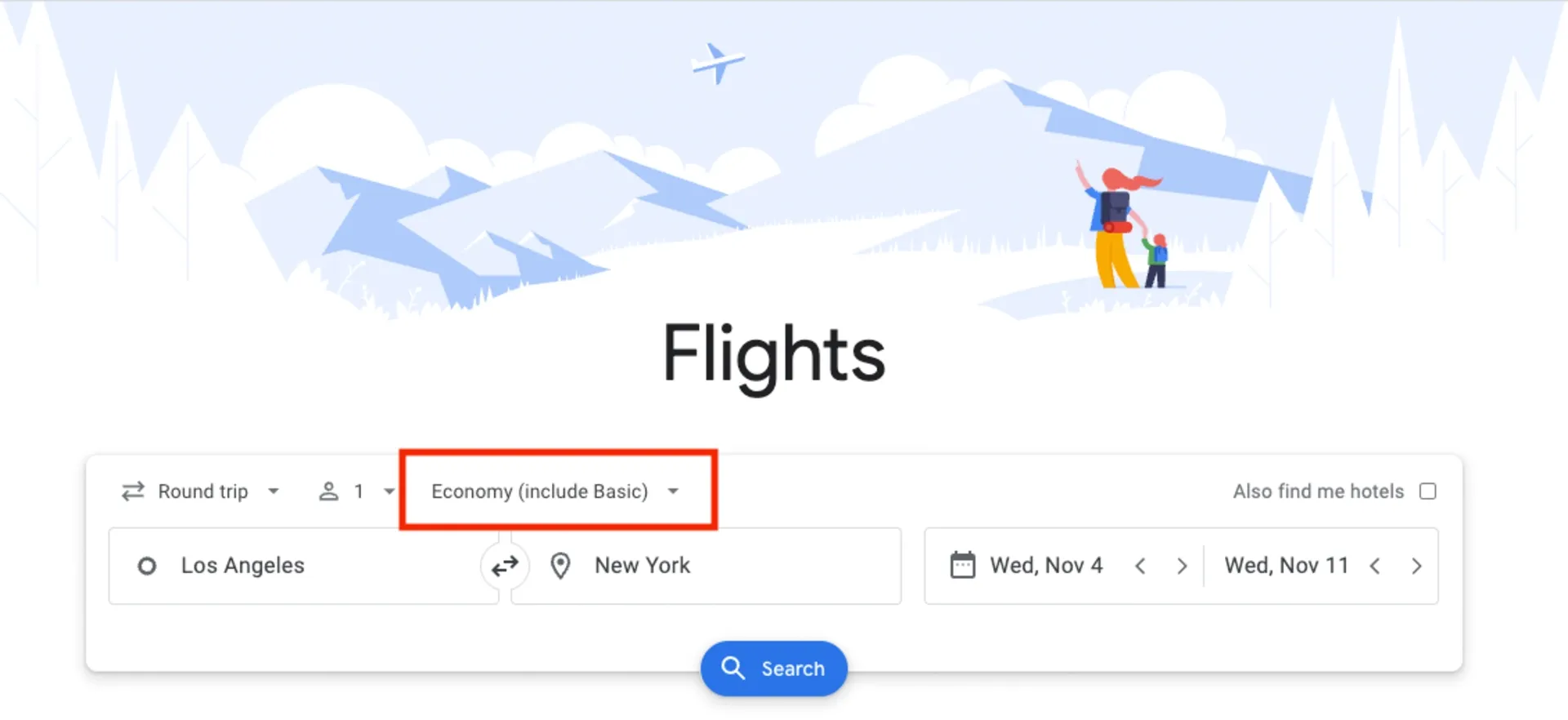
Start a normal search: Select your departing airport, arrival city, and travel dates. Flexible date searches also work with the feature, and you can pair it with price insight tools later.
Step 2: Click the “Economy (include basic)” filter
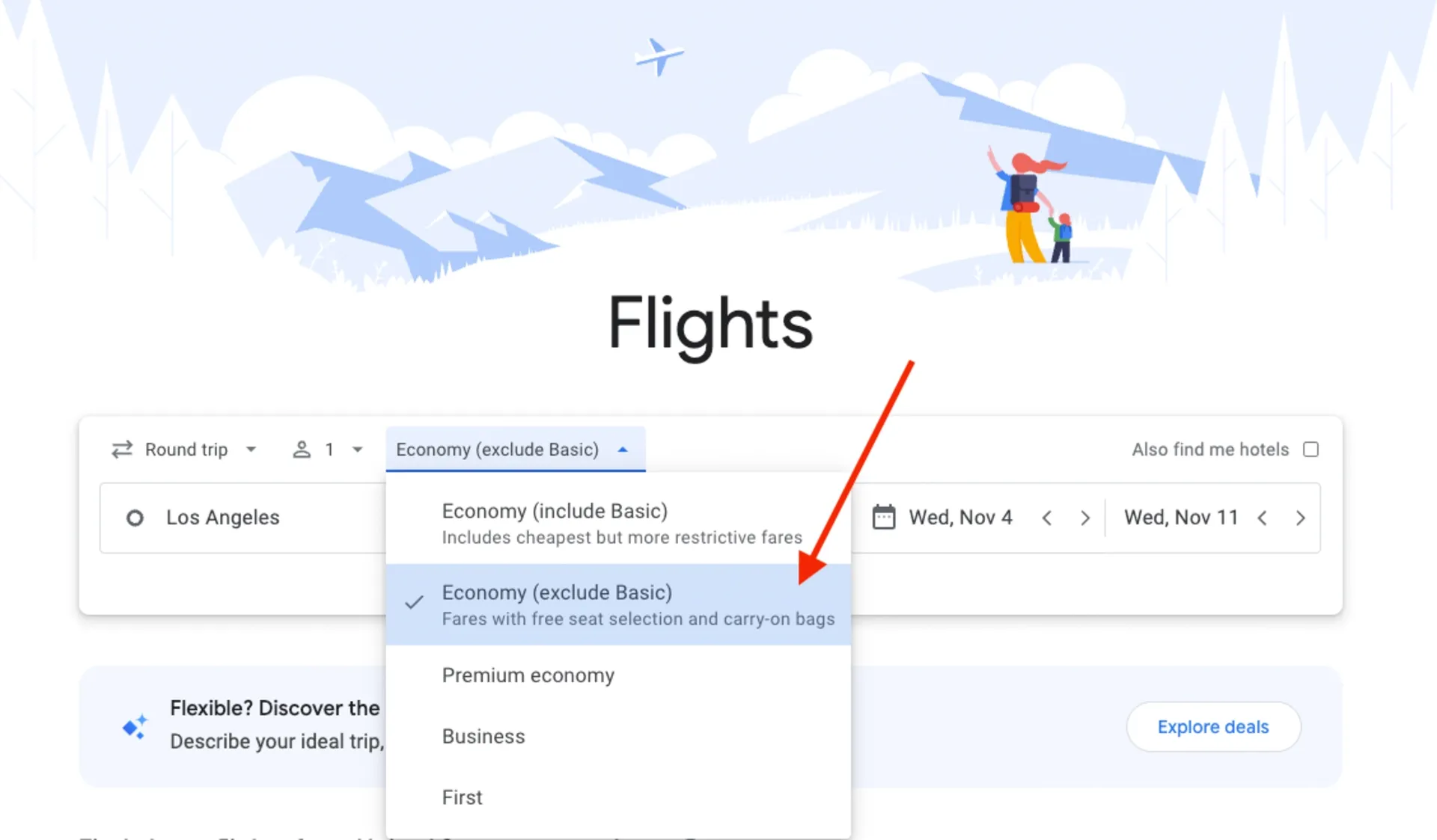
Below the top filter bar, you’ll see the cabin selector, which defaults to Economy (includes basic). This is the spot where the new toggle lives. If the option to exclude basic economy does not exist on the route, you’ll just see Economy.
Step 3: Select “Economy (exclude basic)”
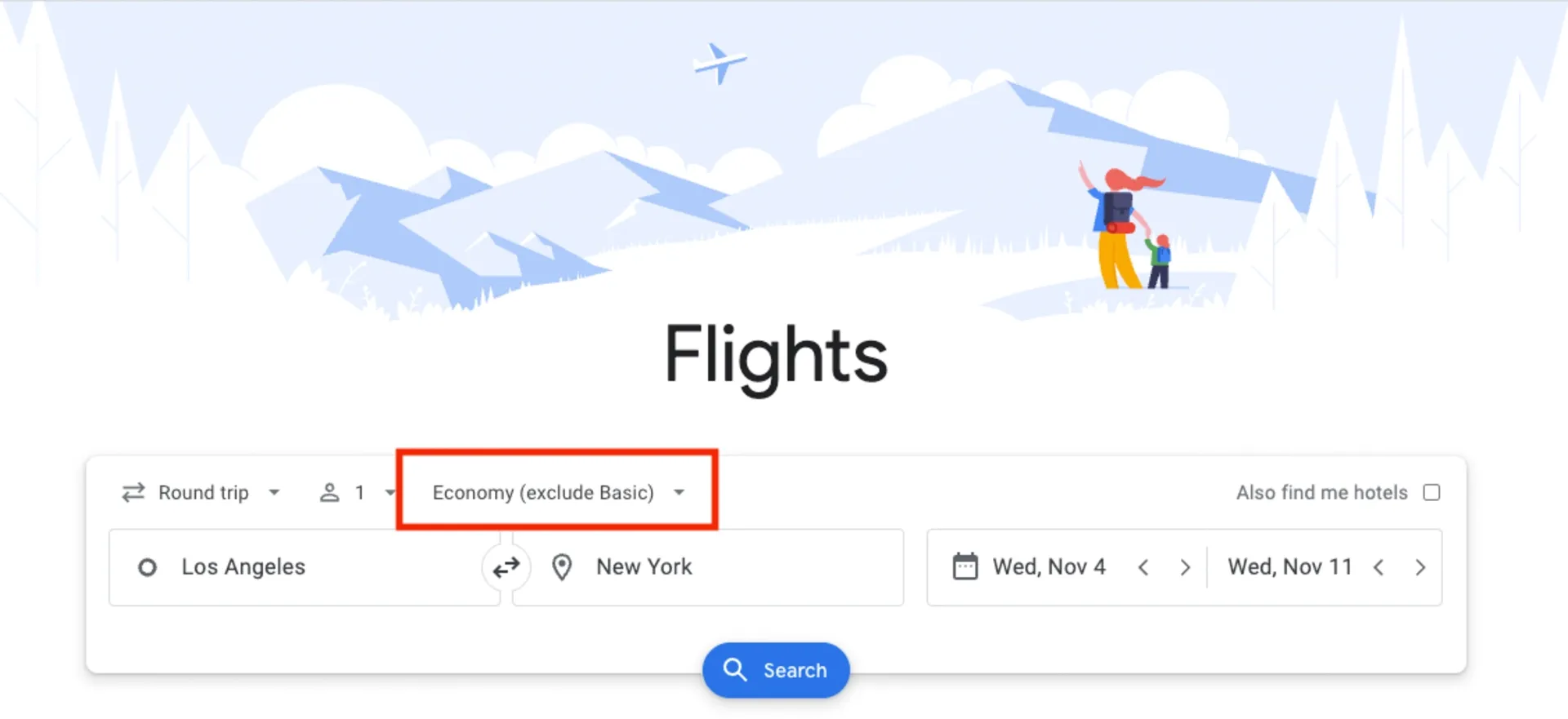
Switch the setting to Economy (exclude basic). Once applied, Google immediately removes all basic economy fares from results.
Benefits of excluding basic economy
Removing basic economy fares isn’t just about comfort—it’s about transparency.
Avoid restrictive rules on seat selection
Standard economy usually includes early seat selection, or at least reasonably priced upgrade options. With basic economy, airlines often mandate random seat assignment or charge steep fees if you want to sit next to someone or avoid the middle seat.
Ensure carry-on and baggage flexibility
One of the most confusing parts of basic economy is baggage rules. They vary wildly by airline. By filtering out these fares, you avoid the guessing game and ensure your ticket includes a normal carry-on bag.
Reduce hassle with flight changes
Life happens. Schedules shift, plans change, weather delays things. Standard economy fares typically offer far more flexibility, including refundable credits or free changes. With basic economy, those options can be limited or expensive.
Comparing prices without basic economy
The biggest advantage of using the Google Flights exclude basic economy filter is clarity. Without basic economy cluttering the results, comparing fares becomes much easier.
Easier comparison between full-service tickets
Instead of toggling between fare details or clicking fine print, you see only the fares aligned with what you’d expect from a standard economy ticket.
When lowest fares are misleading
The trap: Basic economy fares appear tons cheaper, but once you factor in:
- A seat assignment for one or more travelers
- A carry-on bag
- Early boarding
Suddenly, the “deal” costs more than the standard fare. This, of course, depends on the amenities that you are willing to sacrifice to keep the fare low, but it’s an important—and potentially costly—consideration.
By filtering out basic economy early, you save yourself decision fatigue (and often a good amount of money).
Limitations of the filter
The filter is helpful, but not perfect.
Currently only for US and Canada flights
As of early 2025, the feature applies primarily to basic economy flights throughout the US and Canada. For many international airlines, fare classes aren’t standardized enough yet for Google to reliably separate them.
Some airlines may have different fare rules
Not all “standard” economy tickets include the same perks. Low-cost carriers may still charge for:
- Seat selection
- Carry-on bags
- Customer support options
So while this filter cuts out basic economy, it doesn’t guarantee a fully inclusive fare. Always check details before booking.
Pro tips for smart booking
The filter is powerful, but it becomes even more useful when paired with other flight deal finding tools.
Combine with price tracking and alerts
Once you’ve excluded basic economy, turn on flight price alerts for your route. Google will notify you when standard economy fares drop so you don’t miss a good deal while waiting. Enabling price tracking through other platforms, such as Going, Skyscanner, or Kayak, as well can help ensure that you are booking the lowest possible price.
Note: Going only sends deals on full-service carriers that are worth booking—no fare class surprises.

Use flexible dates to maximize savings
Airfare fluctuates dramatically based on travel day. Pairing flexible dates with the filter helps you find the cheapest non-basic fare, not just the cheapest fare overall.
Conclusion
Basic economy fares can sometimes work for light or short trips, but for many travelers they come with enough restrictions, fees, and uncertainty that the savings rarely justify the trade-offs. The new Google Flights exclude basic economy filter makes it much easier to avoid those limitations from the start and see only the fares that offer flexibility, carry-on space, and seat choice.
But filtering out basic economy is just one part of getting a great airfare. If you want to consistently score premium travel without premium prices, Going can help bridge the gap. With a Premium or Elite membership, you get alerts for deals where airlines discount not just economy, but also premium economy, business class, and sometimes even lie-flat first-class seats. Those fares can run 40–50% off normal pricing, and in many cases, they end up costing only slightly more than a standard economy ticket. That means more comfort, a better onboard experience, and fewer travel frustrations without breaking the bank.
Use Google Flights to narrow down fare types and compare options, then let Going do the heavy lifting of finding the rare upper-class deals you’d never spot on your own. Together, they make booking flights clearer, cheaper, and way less stressful.
Frequently asked questions
How do you exclude basic economy fares in Google Flights?
Is it better to exclude basic economy on Google Flights?
Where is this feature available?
What's the difference between basic economy and standard economy?
Can I filter out basic economy when using the "Explore" map feature?

Last updated March 19, 2026