Legrooms for Google Flights: The Easiest Way to Fly Comfortably



March 19, 2026
5 min read
| Legrooms for Google Flights is a free third-party browser extension, not a built-in Google Flights feature. Here's how it works. |
When you’re booking a flight, price usually seals the deal. But comfort matters too (we know we don’t have to tell you that). Legroom can make or break a trip, especially on longer flights. The problem? Airlines don’t always advertise how much space you’ll get upfront, and digging through seat maps for every option is exhausting.
Enter: Legrooms for Google Flights (download it here). This browser extension adds legroom data directly into Google Flights search results, letting you compare flights by price and space all in one go. If you’ve ever wished you could spot the more comfortable option at a glance, this tool is for you. (Available only on Google Flights. Tool not applicable to flight search engines or OTAs, such as Skyscanner or Kayak.)
Note: Legrooms for Google Flights does not allow you to filter by legroom. However, you can use it to see legroom data for each flight at a quick glance.
What is Legrooms for Google Flights
What the extension does
Legrooms for Google Flights is a free browser extension that enhances Google Flights by displaying seat pitch (legroom) information for each flight. Instead of guessing which airline has tighter seating, you can see legroom measurements right alongside price, duration, and stops.
It doesn’t change how Google Flights works—it simply layers the comfort data on top of what’s already there.
What data it adds to Google Flights results
Once installed, the extension adds:
- Seat pitch (in inches) for economy and premium cabins
- Visual indicators highlighting tighter or roomier seats
- Aircraft-specific legroom differences
This makes Google Flights legroom comparisons fast and intuitive, especially when choosing between similar-priced flights.

How to install Legrooms for Google Flights
Installing the extension in under two minutes
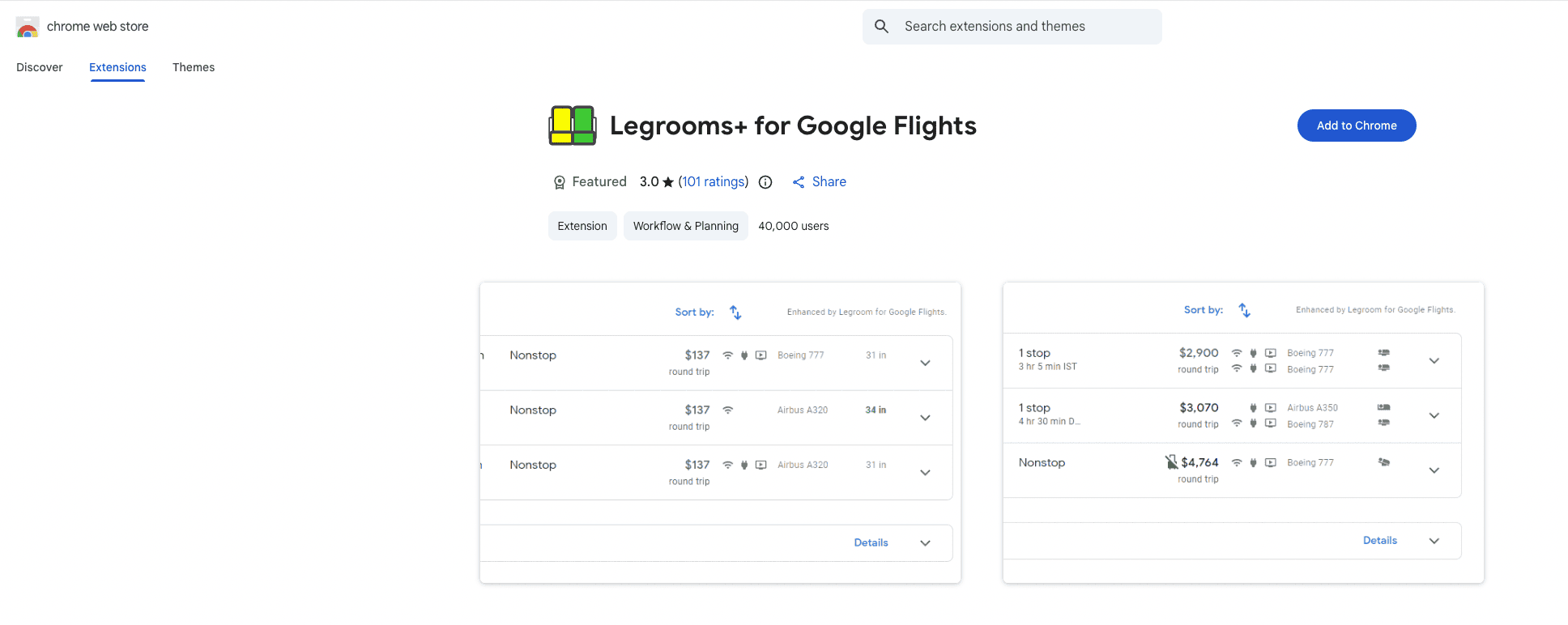
Installation is straightforward:
- Visit the Chrome Web Store
- Search for “Legrooms for Google Flights”
- Click “Add to Chrome”
- Confirm the installation
Done. No account required.
How to enable it inside Google Flights
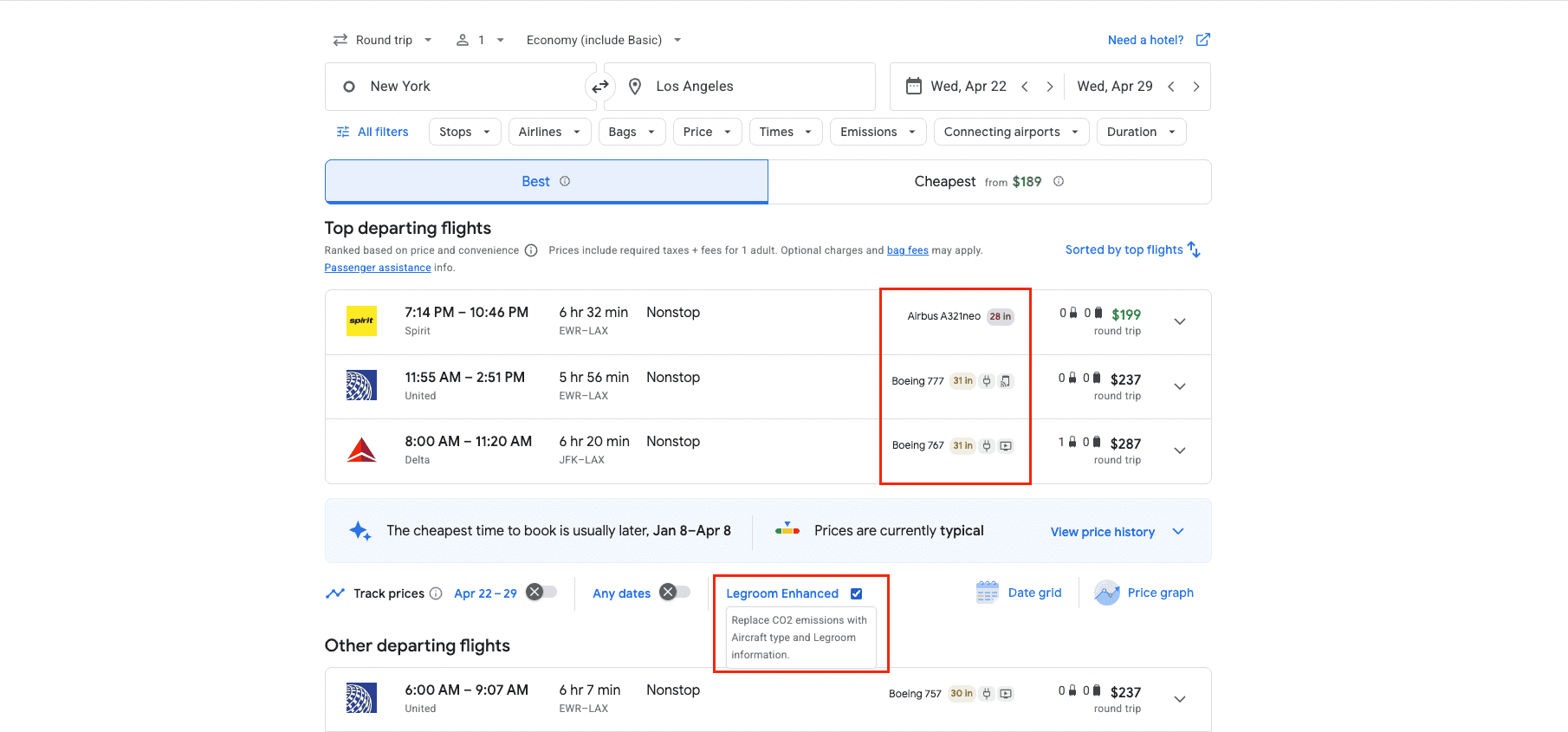
Once installed, head to Google Flights and run a normal search. The extension activates automatically. You don’t need to toggle anything on or off. Legroom data will appear directly in your results if it’s available for that flight.
How Legrooms for Google Flights works
Where legroom information appears
You’ll see legroom data displayed next to each flight option, usually under the airline and aircraft details. It may show something like “31 in legroom” or flag flights with tighter-than-average seating.
This placement right alongside price and other flight features lets you factor comfort into your decision before clicking into details.
What seat pitch measurements actually mean
Seat pitch is the distance from one seatback to the next. It’s the industry standard for measuring legroom, though it doesn’t capture everything about comfort.
As a rough guide:
- 28–30 inches: tight, common on low-cost carriers
- 31–32 inches: average standard economy
- 33+ inches: noticeably more comfortable
Even a one-inch difference can feel significant on longer flights.
Economy vs. premium cabins
Legrooms for Google Flights often shows data for standard economy, premium economy, and extra-legroom economy (e.g., Economy Plus or Main Cabin Extra). This makes it easier to see when a modest fare increase buys a meaningful comfort upgrade.
What else you can see besides legroom
While legroom is the star, the extension may also surface aircraft type comparisons, alerts when legroom is below average, and differences between planes on the same route. It’s especially helpful when one flight uses a newer aircraft with better spacing than another—something prices alone won’t reveal.
How to use legroom data to choose better flights
Comparing airlines by inches, not just price
Two flights might cost the same and take the same amount of time, but one could give you two extra inches of legroom. Legrooms for Google Flights makes those trade-offs visible instantly.
This is especially useful on competitive routes where multiple airlines fly similar schedules.
When more legroom is worth a slightly higher fare
Investing in extra legroom is entirely up to you and what you’d be willing to spend for a bit of extra comfort. But in general, paying $20–$40 more for extra legroom can be worth it if:
- The flight is over three hours
- You’re tall or prone to knee/back discomfort
- You’ll be working, sleeping, or eating with your tray table down onboard
Seeing legroom data upfront helps you make that call confidently.
Routes and aircraft where legroom varies most
Legroom differences are most noticeable on domestic narrowbody flights, older aircraft vs. newer retrofits, ultra-low-cost carriers, and long-haul economy routes. On these flights, the extension can prevent some serious discomfort.
Limitations of Legrooms for Google Flights
Flights and cabins where data may be missing
Not every airline publishes consistent seat pitch data. Some international carriers or regional aircraft may show limited or no information. When data is missing, it doesn’t mean legroom is bad. It just means the information is unavailable.
Why you can’t filter by legroom
The extension adds information, but it doesn’t add new filtering options. You can’t sort flights by legroom alone. You still need to scan results manually. This is a limitation of how Google Flights itself works.
When seat maps still matter
Legroom data doesn’t replace seat maps entirely. You’ll still want to check:
- Exit row availability
- Bulkhead seats
- Seat width and recline
- Window alignment
Think of Legrooms as a shortcut, not the final step.
Legrooms for Google Flights vs. seat maps and alerts
Legrooms data vs. SeatGuru
SeatGuru is great for deep seat-specific details, but it requires extra steps and manual searches. Legrooms for Google Flights excels at early-stage comparison, helping you decide which flight is worth clicking into in the first place.
Many travelers use both: Legrooms for screening, SeatGuru for final seat selection.
Using legroom info alongside price alerts
Legroom data pairs well with Google Flights price alerts. Once you’ve identified the most comfortable flight options, you can track prices for those specific flights instead of chasing the absolute cheapest fare.
Use Going flight alerts for early-stage route identification, then use Google Flights and the Legrooms extension to hone in on your perfect deal.

Is Legrooms for Google Flights worth using?
Absolutely. Considering it’s absolutely free and doesn’t require an account, there’s really no reason not to use it if in-flight comfort matters in your flight booking process even a little bit.
Best for tall travelers and long flights
If you’re tall, fly frequently, or regularly take flights over three hours, this extension is an easy win. It saves time, reduces guesswork, and helps you find the best seats in the sky.
When paying for extra legroom still makes sense
Even with legroom data, there are times when upgrading is still worth it, especially on overnight or long-haul flights. The extension helps you see when that upgrade offers real value versus when it’s just marketing.

Frequently asked questions
Is Legrooms for Google Flights free?
Does legroom extension work on all airlines?
Can you use legroom extension on mobile or Safari?
How accurate is legroom and seat data?
Last updated March 19, 2026